• Home
  • News
  • My Imagery
    • Upload
    • Imagery Queue
    • My Profile
    • Login
  • Products
    • Example Data
    • Products and Services
    • CONSULTING
  • Support
    • FAQ
    • Upload Guidelines & Pricing
    • Documentation
  • About Us
    • About Us
    • Contact Us

General DroneMapper Questions and Information
  • How do I get the best results? Check out the DroneMapper Imagery Input Guidelines Page located here.

  • How do I pay? You can can with a credit card via paypal, a paypal account or you can request an invoice. Contact us for an invoice.

  • You must geo-tag your images or use a GPS enabled camera. Unique GPS EXIF Lat, Lon, Altitude are required for each image. You must have Camera Make, Model, Focal Length and other standard tags in your imagery metadata.

  • We recommend using Ground Control Points (GCP) for the most accurate solution.

  • Why is my account blocked? Inactive non-customer accounts are blocked at the end of every week by our automated system. Contact us to have access restored.

  • What types of camera hardware are compatible with dronemapper.com? Canon, Panasonic, SwingletCam, Ricoh, Nikon, pretty much anything.

  • Where can I get a drone that integrates well with your service? Falcon-UAV.com, SkyDrones.com.br, Pteryx, Visual-RC, Event38.com

  • What is your security like? Your imagery is protected by IP address and also HTTPS if you choose. We take security seriously and strive to protect your personal information. You can enter multiple IP addresses for which you would like to allow access to your data, this option is available on your profile page.

  • Do you offer consulting and/or GIS application development services/consulting? Yes, please contact us if you need help with your project.

  • Should I do any pre-processing on my imagery? No, JPGs from your camera work best. Certain programs can alter EXIF data or remove it completely. We have support for RAW and NEF image formats -- please contact us if you require this feature.

  • Why did my upload fail? During long uploads if your computer or laptop goes to sleep the upload will be interrupted. In certain cases, sometimes EXIF data isn't detected properly and the upload can fail. The DroneMapper web interface supports up to 250 images during an upload. If you need to upload more data we support FTP and receiving RAR files via the web.

  • GoPRO cameras are not a good choice for photogrammetry applications.

  • How do I clip DroneMapper products to a certain Area of Interest (AOI)? Send us a polygon shapefile in UTM projection for the AOI and we will clip your data products to that area before or after processing.

DroneMapper Camera Recommendations and Information
  • GoPRO Cameras are not a good choice for photogrammetry applications due to the distortion and generally lower mega pixel size.
  • We have 75+ camera configurations in our database and we are adding more daily.

Consumer
The PowerShot SX260 HS is a GPS-enabled 20x compact superzoom with a 25-500mm equivalent lenses featuring the company's latest 7-mode image stabilization system. It features a 460k dot screen and the ability to shoot burst of images at 10.3 frames per second. It uses a 12MP back-lit CMOS sensor.

Sensor Size: 1/2.3" (6.17 x 4.55 mm)

Notes: CHDK Installation for Intervalometer, Advanced Shutter Control, GPS Settings and more.

SX260HS @ dpreview.com
$229.00
The Canon PowerShot S100 features a broader, 5x lens range (24-120mm equiv.), the company's latest image stabilization and built-in GPS. The interesting specification, from our perspective, is the homegrown 12MP CMOS sensor. The Canon S100 is particularly well-suited to two types of photographers: compact camera shooters looking to upgrade to a similarly small camera with more control, raw mode and better image quality, and ILC photographers looking for a truly compact 'take anywhere' pocket camera with much of the same manual control as their larger cameras.

Sensor Size: 1/1.7" (7.44 x 5.58 mm)

Notes: CHDK Installation for Intervalometer, Advanced Shutter Control, GPS Settings and more.

S100 @ dpreview.com
$275.00


Prosumer
The Sony Alpha NEX-5N is the fourth model in Sony's NEX line of APS-C format mirrorless interchangeable lens cameras. Just as the NEX-C3 replaces the NEX-3, the 5N is a direct replacement for its predecessor the NEX-5, using the company's latest 16.1MP CMOS sensor in place of the previous 14MP chip. Although the 5N is nearly indistinguishable from the NEX-5 on the outside, it is actually a very different camera, and one that is worthy of serious attention.

Sensor Size: APS-C (23.4 x 15.6 mm)

Notes:

NEX5N @ dpreview.com
$550.00
The D5100 sits comfortably in the middle of Nikon's non-Pro DSLR lineup, carefully blending the features of the beginner-friendly D3100 with the image capabilities of the more expensive D7000. As such it features a 16.2MP CMOS sensor, 1080p (H.264) movie capability and an articulated 920k dot LCD in a relatively compact body. Like previous Nikons at this price it features a pentamirror viewfinder and 11-point AF system capable of tracking subjects by distance and color, as well as the still-improving full-time AF-F mode for use when shooting in live view mode. It also becomes the first Nikon DSLR to offer in-camera special effect filters while shooting either stills or video.

Sensor Size: APS-C (23.6 x 15.7 mm)

Notes:

D5100 @ dpreview.com
$750.00


Professional
The Sony NEX-7 enthusiast-targeted mirrorless interchangeable lens camera manages to squeeze vast amounts of the A77's capabilities into a body barely bigger than the existing NEX models. It packs a 24MP APS-C CMOS sensor and 2.4M dot OLED electronic viewfinder into its magnesium alloy body and yet still finds room for a pop-up flash and Alpha hot shoe.

Sensor Size: APS-C (23.5 x 15.6 mm)

Notes:

NEX7 @ dpreview.com
$1000.00
When the Nikon D800 was announced, the specification that got everyone's attention was - and to a large degree still is - the massive pixel count of its 36.3MP CMOS sensor. When a moderately-sized full-frame DSLR body aspires to go toe-to-toe with medium format cameras and backs at a fraction of their price, other attributes can seem secondary, but 3, 1/2 years since Nikon released the D700 Nikon has updated much more than just the resolution. The D800 has a significantly more advanced feature set than its predecessor, particularly in terms of its video capabilities that make it, on paper at least, a viable and tempting option for professionals.

Sensor Size: Full frame (35.9 x 24 mm)

Notes:

D800 @ dpreview.com
$3200.00


How Does DroneMapper Compare? Result Details and Information


Ground Control Points & Information


CompassData Inc., The World's Largest Commercially-available Ground Control Data Set - Complete Global Coverage with 18,000 Ground Control Points.
With the growing constellation of commercial earth-observation satellites, there has been an associated growth in the inclusion of spatial data in our everyday lives. Once the realm of surveyors and rocket scientists, Global Positioning Satellite (GPS) technology is now in our automobiles, wrist watches, and cell phones, and is becoming increasingly tied to image data, be it a picture of the Earth or the front of the restaurant we just made cell phone reservations with while stuck in traffic.

To enable such generalized use of aerial, satellite and ground-based imagery, geospatial professionals process the collected images with ground coordinates in order to correctly position the imagery in relation to the Earth.

To ensure that the image is in the right position, and that the correct image of the restaurant comes up on the screen of the onboard navigation system in our car, it is necessary to provide accurate ground coordinates to tighten the accuracy of the overhead imagery.

This is the role of CompassData. We are continually collecting new Ground Control Points (GCPs) across North America and around the world to provide accurate coordinate data to support an increasing variety of applications.

Reliable GCPs are an essential input for precise orthorectification of:

  • Remotely sensed imagery
  • LiDAR and IFSAR Surface Models
  • Image and mapping data quality assessment
  • Photogrammetric mapping
    and
  • A fundamental building block of Geographic Information System (GIS) development
DroneMapper requires at least 5 Ground Control Points (GCP) which are visible in at least 5 of your 2D images. To process your imagery with GCP support we require the following data files:

Filename: DroneMapperGCP_3D.txt

NAME X Y ELEVATION PRECISION X/Y PRECISION Z
15196 521414.188 4368210.231 1840.288 0.005 0.007
UAV004 520938.03 4367378.612 1813.835 0.03 0.05
15180 521465.345 4366967.099 1829.826 0.005 0.007
UAV003 521945.249 4366515.498 1861.73 0.03 0.05
15182 522832.461 4367201.373 1890.136 0.005 0.006
15205 522405.402 4366801.531 1857.779 0.005 0.009
Filename: DroneMapperGCP_2D.txt
NAME IMAGE PIXEL X PIXEL Y
UAV004 IMG_0291.JPG 1080 1605
UAV004 IMG_0292.JPG 1130 2851
UAV003 IMG_0306.JPG 1251 218
UAV003 IMG_0307.JPG 1124 1680
UAV003 IMG_0319.JPG 1062 931
UAV003 IMG_0320.JPG 1316 1834
UAV003 IMG_0321.JPG 1189 2674
UAV004 IMG_0347.JPG 1986 236
UAV004 IMG_0348.JPG 1662 1205
UAV004 IMG_0349.JPG 2014 1459
UAV004 IMG_0350.JPG 1968 2147
15205 IMG_0489.JPG 1376 1856
15205 IMG_0490.JPG 1861 2294
15205 IMG_0491.JPG 1176 2645
15196 IMG_1086.JPG 1475 444
15196 IMG_1087.JPG 1510 1035
15196 IMG_1088.JPG 1623 1947
15180 IMG_0299.JPG 452 1592
15180 IMG_0300.JPG 675 2668
15180 IMG_0333.JPG 1651 730
15180 IMG_0334.JPG 1625 1405
15180 IMG_0335.JPG 2463 1936
15182 IMG_1128.JPG 2684 1449
15182 IMG_1129.JPG 3116 2004
15182 IMG_1130.JPG 3310 2579
The GCP txt files should be uploaded with your imagery. In the future we will release a small Windows based tool to generate the 2D GCP txt files. We recommend using CompassData Inc., to obtain the required information for precise 3D GCP. CDI also offers Independent Quality Assurance and Quality Control (QA/QC) for your data.
We've created a small windows x64 application to aid in the identification of each GCP and construction of 2D GCP files:


Data Collect: Start to Finish with CompassData GCP and Falcon UAV

Click here to download a sample of the original imagery. Use exiftool or GeoSetter to view EXIF metadata and GPS tags.


Identify your area of interest (AOI), desired map resolution, flight height (AGL), sensor footprint on the ground and expected ground speed for data collection. Plan your flight waypoints to meet the overlap requirements discussed in the next section and overshoot your AOI in all directions to account for imagery lost in the turns. Make sure your sensor is operating correctly for the expected flight conditions - nothing worse than collecting useless imagery in a 1-hour or longer flight.


Each image must be geo-tagged with an unique latitude, longitude and elevation either using a GPS-enabled camera or the platform's flight log. Best processing results are obtained using the in-track and cross-track overlap shown in the figure above. Make sure image blur is eliminated by setting the sensor's shutter speed to account for the maximum ground speed expected.


After imagery collection the data set is trimmed as shown in the example above. Only the imagery within the area of interest plus some overshoot is used for data processing. In this example in-track flight path overshoot and some cross-track imagery have been eliminated prior to processing.


Ground control or truth points (GCPs) can be used in the data processing to improve the absolute geo-spatial position of the resulting ortho and DEM. Sub-meter positional accuracy has been demonstrated. Two additional data files are required when using GCPs - 1) a list of the GCPs with its latitude, longitude and elevation coordinates and the measurement precision, 2) a list of each image that contains a GCP with its corresponding pixel position within that image.


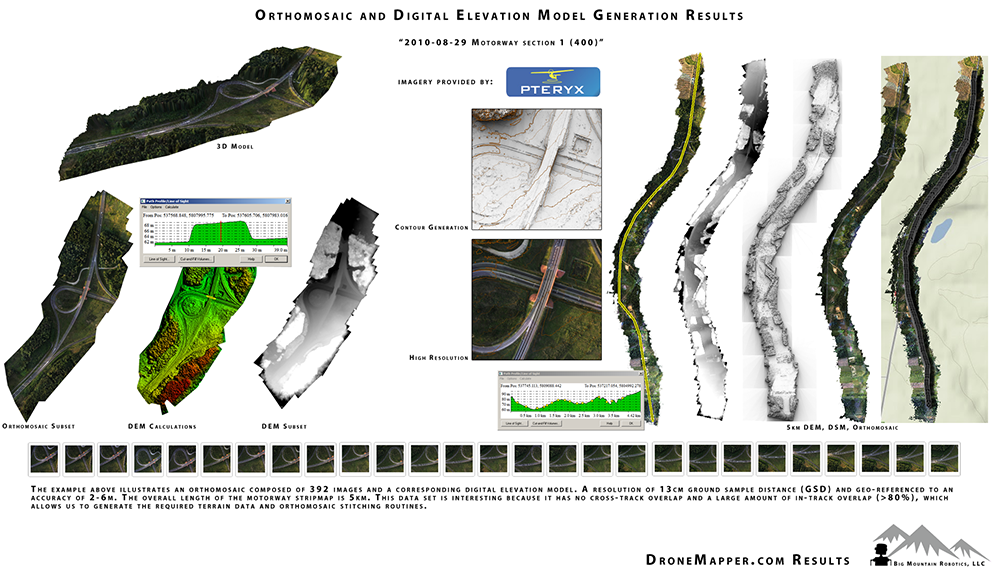
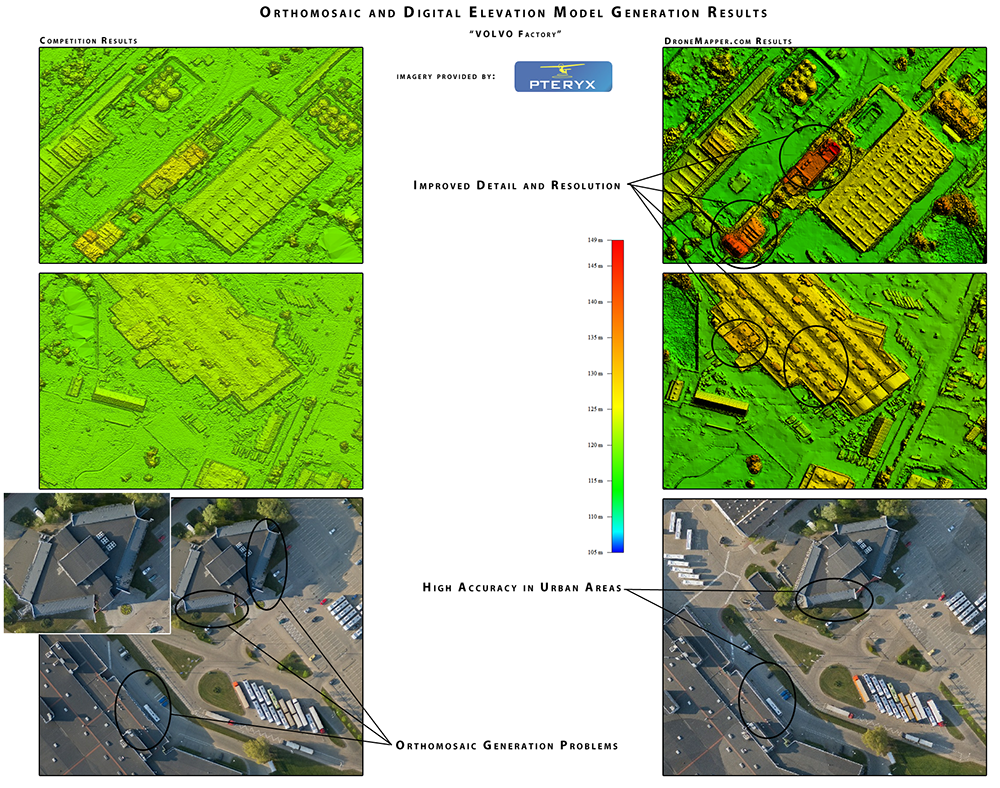
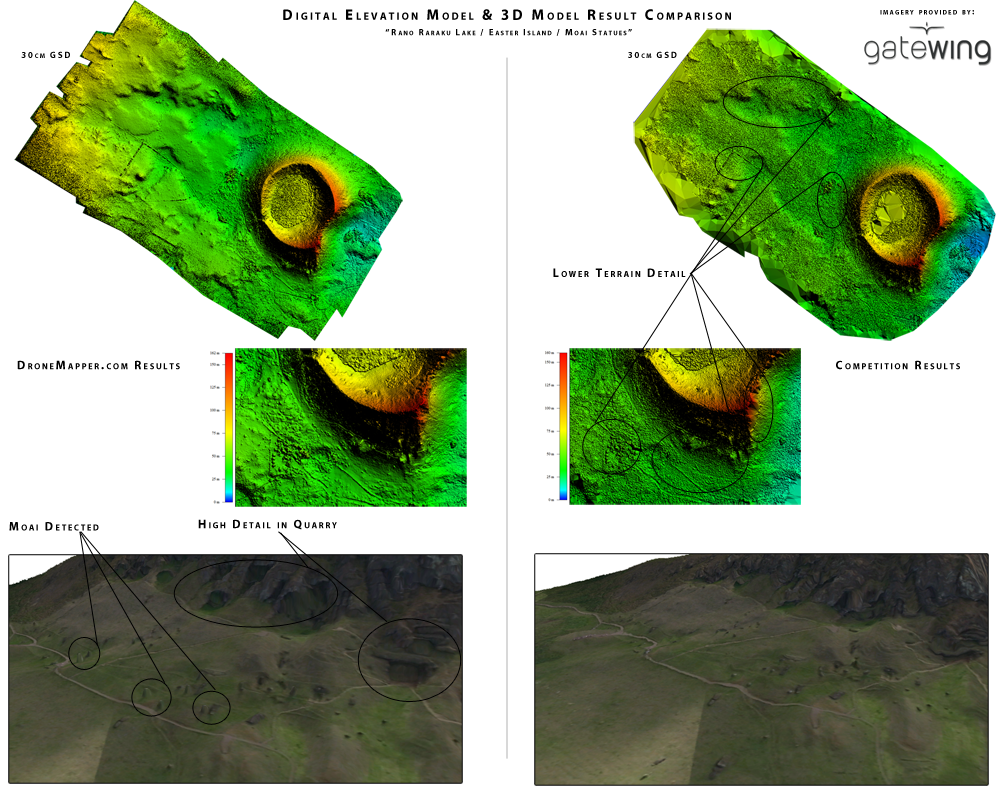
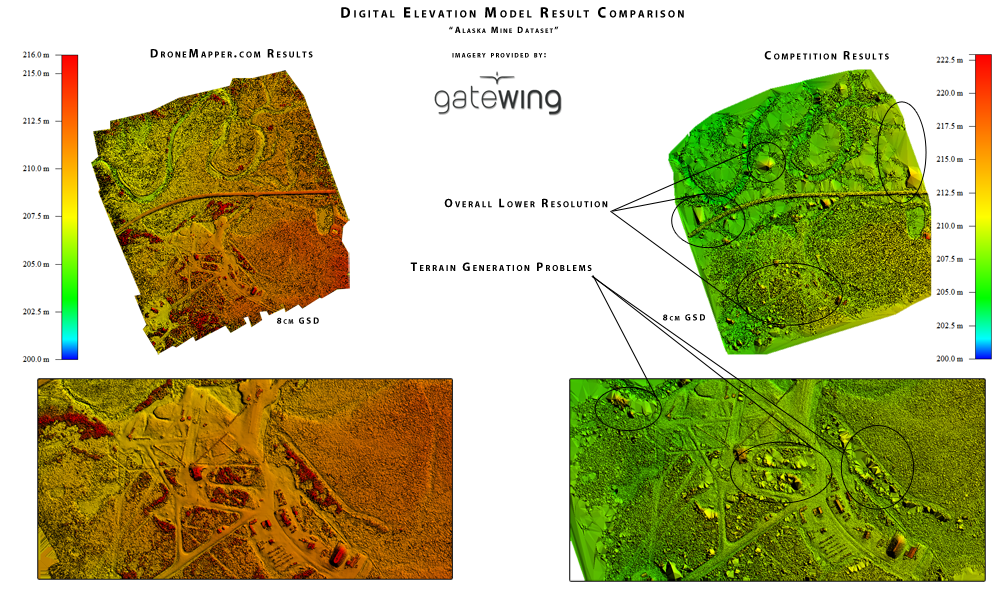
Precision geo-referenced orthomosaics, DEMs, DSMs and 3-D point clouds are produced by DroneMapper processing. These can be used with industry standard GIS applications to solve your unique problem and/or provide visualization not previously delivered by 2-D photos alone.


Should you need assistance in any phase of your imagery collection project please don't hesitate to contact us or our partners!
 

Example Mission: Residential Area Mapping / Flood Planning with Falcon UAV

RESIDENTIAL AREA MAPPING / FLOOD PLANNING:

Visit Falcon UAV for more information.

The following mission was flown covering a mapped area of approxiamately 1.36 square kilometers.  For the mission Falcon UAV flew a preprogrammed GPS grid pattern at 200 meters Above Ground Level (AGL) with in flight updates to account for winds.  The mission was flown with a GPS enabled Canon Power Shot 12.1 MP camera.  Given this camera and flight altitude a 6cm / pixel level was achieved (lower altitudes and other cameras may be flown at improved resolutions). Once the flight was completed the images were transmitted to Dronemapper to generate the image products.  Dronemapper image products included a Geo-Referenced Ortho Mosaic, a Digital Elevation Model (DEM), and a Digital Surface Model.  The combined image products were used to generate a model for flood planning in this neighborhood. -Chris Miser/Falcon UAV 


Visit Falcon UAV for more information.
 

Example Mission: Country Club Aerial Photography / Digital Elevation Model For Watering with Falcon UAV

COUNTRY CLUB AERIAL PHOTOGRAPHY / DIGITAL ELEVATION MODEL FOR WATERING:

Visit Falcon UAV for more information.

The following mission was in two sorties covering a mapped area of approxiamately 3.4 square kilometers in ~20 knot winds.  All mission parameters were the same as the previous example.  Once the flight was completed the images were transmitted to Dronemapper to generate the image products however in this case the data was processed using 6 known Ground Control Points (GCPs) (Provided by CompassData) in addition to the Falcon UAV GPS information. The Geo-Referenced images products were provided to CompassData for an independent error analysis using 15 independent GCPs. Using the GCPs the Root Mean Square Error (RMSE) in the horizontal X and Y directions were 17cm and 18cm respectively and the vertical RMSE was 1.9m for a CE90 of 35cm.  Images below also show the ability to do volumetric and elevation measurements using the combined image products. -Chris Miser/Falcon UAV  


Visit Falcon UAV for more information.
 

Example Mission: Geo-Referenced VIS + NIRVIS and NDVI Generation for Agriculture / Vegetation Monitoring

VIS + NIRVIS AND NDVI GENERATION FOR AGRICULTURE:

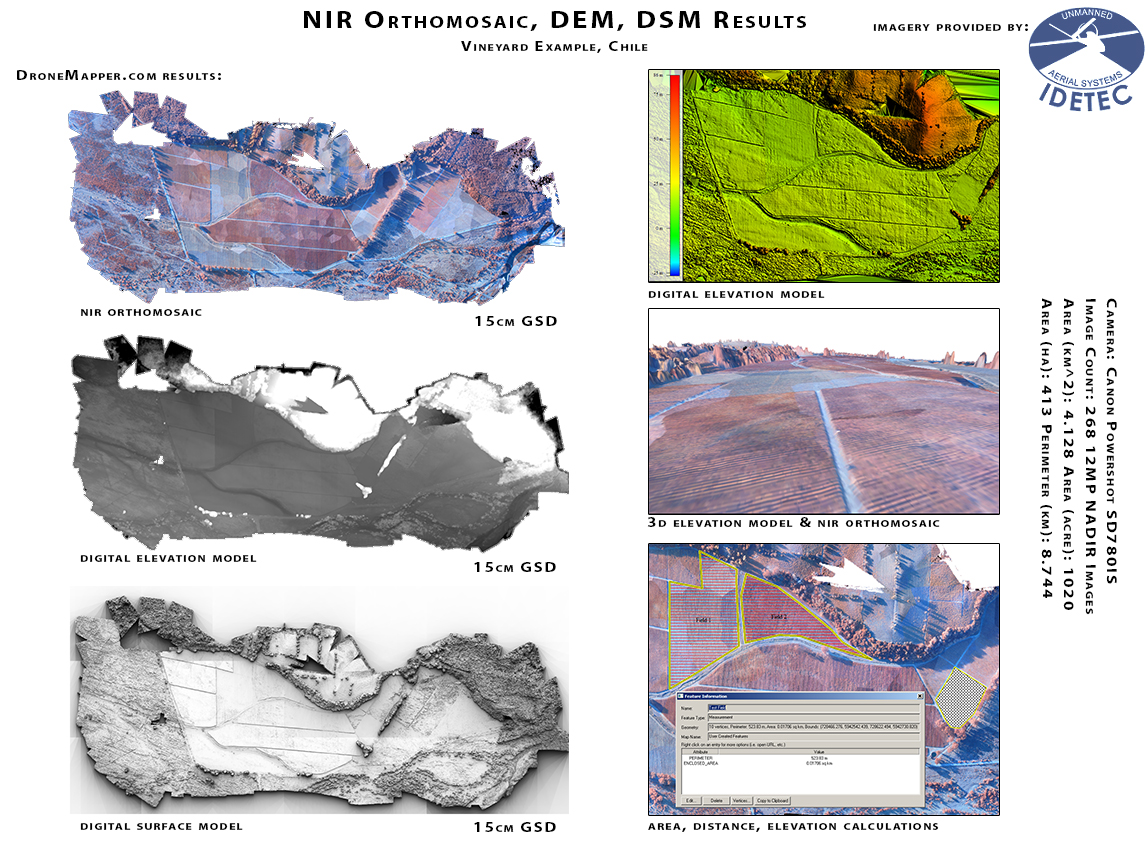
One way to generate a geo-referenced NDVI / EVI / EVI2 Vegetation Index is to fly the area of interest (AOI) with a visible (RGB) and full spectrum (RGB+NIR) camera. Once the RGB and RGB+NIR images are processed inside DroneMapper, we have two geo-referenced orthomosaic results from which we can generate a pure NIR orthomosaic. Now that we have generated an orthomosaic with the NIR values we can use OTB Orfeo Toolbox to compute the BandMath and build our NDVI. In order to generate accurate results, there must be a 1 to 1 pixel relation between the NIR ortho and the NIRVIS ortho. In other words, these two orthomosaics must be the same size, scale, GSD and AOI.

"A simpler, arguably comparable method to create NDVI data is to use an "NDVI" converted camera from MaxMax.com, and calculate a blue NDVI. The converted camera senses blue, green, and NIR. The blue is substituted for red in the NDVI calculation because blue light absorption is also correlated with photosynthesis. The low altitude of a small UAV mitigates atmospheric interferences in the blue band. Having all the bands needed for an NDVI produced in a single, affordable camera greatly simplifies processing into an NDVI data layer. BTW, I have no affiliation with MaxMax.com, I just wanted to show the availability of an alternative to the traditional RGB+NIR imagery for vegetation analysis. It becomes a practical alternative when we use low-flying UAVs. Simplicity and efficiency = good for agricultural applications." --FlyingMerf at DIYDRONES.com

The only potential drawback to the 'single camera' method is you will not be able to produce a visible (RGB) orthomosaic from the flight, only a false color IR (FCIR) orthomosaic can be generated and geo-referenced. Imagery courtesy of Pteryx UAV.


Example Mission: Dense Urban Environment / 3D City Mapping - Bogota, Colombia

DENSE URBAN ENVIRONMENT / 3D CITY MAPPING - BOGOTA, COLOMBIA


Example Mission: Difficult Terrain with Large Elevation Variance - Red Rocks Amphitheatre, Colorado with Falcon UAV

DIFFICULT TERRAIN WITH LARGE ELEVATION VARIANCE - RED ROCKS

"Falcon UAV and DroneMapper flew Red Rocks Amphitheatre to illustrate a wide range of imagery capabilities available to customers and users.  Data generated from this flight included a virtual fly through, aerial photography, georectified orthomosaic, digital elevation model, and digital surface model." -Chris Miser / Falcon UAV   


Example Mission: NIR-G-B Single Camera System: Geo-Referenced NDVI Generation for Agriculture / Vegetation Monitoring

NIR-G-B SINGLE CAMERA: NDVI GENERATION FOR AGRICULTURE


  • News
  • Privacy Policy
  • Terms Of Use
  • Contact Us